


Disney+
4.3190.67K Reviews
App Specs
- Version
- 26.12.1+rc1-2026.07.15
- Updated On
- License
- Free
- Downloads
- 500,000,000+
- Developer
- Disney
- Categories
- Entertainment
- Platform
- Android, iOS
Screenshots

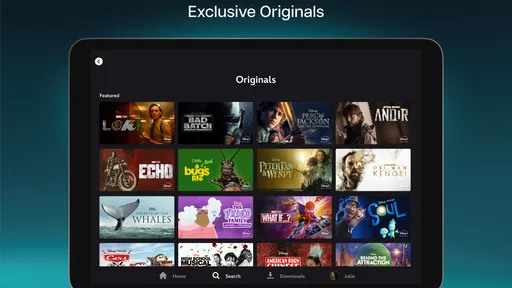
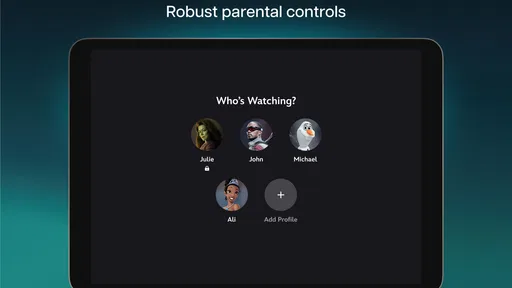
 Analysis by AppCompare
I tend to judge a streaming app by what happens after the first burst of excitement: do I still open it when the familiar favorites have had their turn, and does it make choosing something to watch easier rather than harder? Disney+ makes a strong first impression because its worlds are easy to recognize, but its lasting value depends on how often those particular worlds fit your household’s viewing habits. I’d consider it less a universal replacement for every entertainment service and more a convenient home base for people who regularly return to Disney stories and related franchises.
Why the first week feels easy
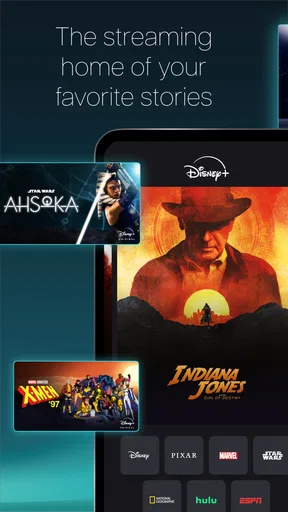
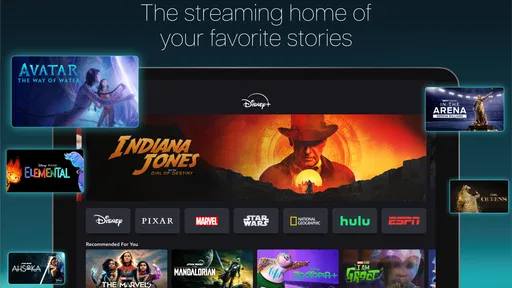
On a new account, browsing can feel like walking into a well-organized shelf of recognizable choices. Disney, Pixar, Marvel, Star Wars, and National Geographic give the catalog clear signposts, so I can start from a mood or familiar universe instead of trying to make sense of a completely mixed library. That identity is a genuine advantage when someone in the family already has a film or series in mind.
The app is an entertainment service from Disney, and it is free to install, though watching through the service involves in-app purchases. Its Teen age rating is worth noticing if you are setting it up for a household with younger viewers: I would check the profile and parental settings rather than assume that a broad family brand means every title is suitable for every child. The service has a 4.3 average from around 4.9 million ratings, and it has passed 100 million installs, which suggests it has become a familiar option for many viewers, not that it will suit every person’s taste.
For a first-week test, I’d avoid spending the whole evening scrolling. Search for one specific title, then browse a single collection that matches what you actually enjoy. That quickly tells you whether the catalog has enough depth for your interests, and it reduces the common streaming trap of spending more time choosing than watching. If you are trying it with family, ask each person to name one thing they would genuinely watch; a large library matters less than whether it has a few reliable picks for everyone.
A Magical World of Content
From the get-go, the sheer volume of content available on Disney+ is mind-blowing. You’ve got everything from the animated films that defined your childhood to the latest blockbuster hits. And it’s not just Disney! The app is packed with content from Marvel, Star Wars, National Geographic, and more. Honestly, it’s like someone waved a magic wand and brought all your favorites under one roof.
User-Friendly Interface
Now, you might be thinking, "With so much content, won’t it be hard to find what I’m looking for?" Not at all! The interface is super intuitive. Everything is neatly categorized, making browsing a breeze. Plus, there’s a handy search function if you’re after something specific. I was impressed by how quickly I could find what I wanted to watch.
That quick search is most useful when you have a plan, but I still treat recommendations as suggestions rather than a complete guide to the catalog. When a particular franchise dominates the screen, I go back to search or switch to a different collection instead of assuming the first row represents everything worth seeing. A small habit that helps: keep a mental note of a title you want to watch later, then look it up when you have time. It is more efficient than repeatedly browsing without a decision.
Worth Reading Before You Choose

Flipboard Shows What News Apps Must Do Beyond the Feed

Switching to Android Auto Means Rethinking Your Driving Routine

Google Calendar Makes a Crowded Week Easier to Manage

Ludo King Makes the Most of the Minutes Between Plans

Baby Panda World Brings Quick Play to Modern Phones, but Its Game Library Feels Busy

ESPN’s Live Game View Makes Following Close Games Easier
Features That Enhance the Experience
Beyond the content, Disney+ has some great features that elevate the viewing experience. One of my favorites is the ability to download shows and movies for offline viewing. This is perfect for long flights or road trips. The app also supports multiple profiles, so everyone in the family can have their personalized recommendations. And for those who love a cinematic experience, many titles are available in 4K UHD and HDR.
Downloads are especially useful when I want to make a journey less dependent on a steady connection. I would choose the episodes or film before leaving, allow the downloads to finish, and check that they appear in the app while I still have internet access. It is a simple preparation step, but it avoids discovering too late that the travel plan depended on streaming. I also think downloads work best for a short, deliberate queue rather than an attempt to save a huge library: they are there to support a trip or commute, not to remove the need to choose.
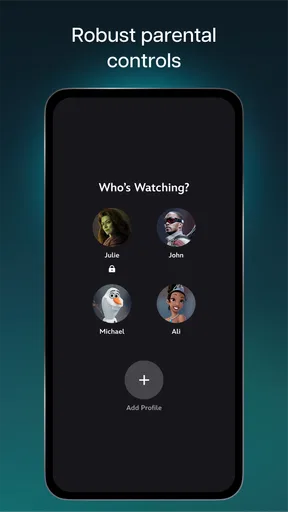
Profiles are more than a tidy way to separate names. In a shared home, they can keep different viewing interests from becoming one muddled recommendation feed. I would set up separate profiles early, especially if adults and children use the same account, and review the available controls before handing over a device. The practical trade-off is that profiles only help when people consistently use their own; switching profiles is a small step, but skipping it can make recommendations less personal over time.
Picture quality is another point where expectations should be realistic. Some titles are available in 4K UHD and HDR, which can make a film feel more impressive on a capable display, but I wouldn’t choose a subscription solely for that label. The actual benefit depends on the title and the screen you are watching on. On a phone during a commute, a dependable download and a comfortable viewing session matter more to me than chasing the highest picture format.
Seamless Across Devices
Another thing I love about Disney+ is how seamlessly it works across devices. Whether you’re watching on your phone, tablet, or smart TV, the app delivers a smooth and consistent experience. It’s great to start a show on your TV and then pick up right where you left off on your phone.
That flexibility suits an ordinary evening: I might start an episode on the television, pause when dinner needs attention, and continue later on a phone while someone else uses the main screen. It is a useful convenience, but I would not treat it as a reason to watch everywhere by default. A bigger screen is better for a film I want to give my attention to; a phone is handy for brief viewing or travel. Being able to move between devices is most valuable when it follows the way a day actually unfolds.
Original Content Worth Watching
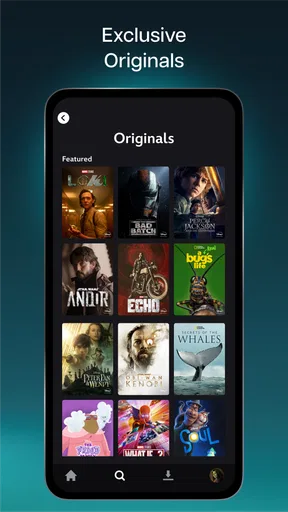
Let’s talk about the originals. Disney+ isn’t just about reliving old favorites. The platform is rolling out some stellar original content. Shows like "The Mandalorian" have become cultural phenomena, and there’s a steady stream of new series and movies that keep things fresh. The quality of these originals is top-notch, and they’re definitely worth checking out.
When month-to-month value holds up
After the novelty fades, the question is whether the app becomes part of a routine. For a household that watches Marvel or Star Wars stories together, revisits Pixar films, or keeps returning to Disney animation, the library can earn a regular place in the evening. National Geographic gives it another kind of viewing occasion, so it is not only a choice for blockbuster nights. I’d keep it in my rotation if several people can name things they plan to watch, rather than relying on a vague feeling that there must be something good somewhere.
Compared with general-purpose streaming services, Disney+ has a more focused identity. That focus makes it easier to browse when you know you want one of its recognizable worlds, but it also narrows the reason to open it if those worlds are not your preference. A service with a broader mix of unrelated dramas, comedies, or reality shows may be a better everyday fit for someone whose tastes change widely. I see Disney+ as complementary: strong when its particular catalog matches the occasion, less convincing as the only place to look for every genre.
The recurring-value test I use is simple: do I have a few specific titles lined up, and does someone else in the household also use the app? If the answer is yes, profiles and shared browsing can make it a convenient choice. If I finish the one series that brought me in and then go weeks without opening the app, the large catalog alone is not a persuasive reason to keep it active. I’d reassess based on actual viewing, not the number of titles I imagine I might watch someday.
Keeping the app useful without extra fuss
Maintaining a good experience does not need to become a project. I would keep profiles distinct, search directly when I know what I want, and download only the travel viewing I expect to use. Those habits address the most common friction points: recommendations shaped by mixed household tastes, aimless browsing, and relying on a connection when I may not have one. They also make it easier to tell whether the service is still serving the household or just sitting on a device.
If you are deciding whether to install it, the Android minimum is version 5.0, and the current release is 4.20.2+rc1-2025.12.09. The app first arrived on November 8, 2019, and its developer is Disney. Those details help set expectations for compatibility and identify the service, but the more practical question is whether your phone or tablet has enough room for the app and any offline viewing you plan to do. I would also review the purchase screen carefully before committing: the listed in-app purchase range runs from $11.99 to $999.99 per item, so it is sensible to understand the specific option being offered rather than assume every payment has the same purpose or terms.
For parents, the Teen content rating is a useful prompt to check what a child can access and how profiles are configured before watching becomes a routine. For travelers, the key question is whether the titles they want can be downloaded and are ready before departure. For someone who mainly wants casual background viewing, the better test is whether the familiar catalog provides enough variety without requiring a long search. These are different needs, and the app’s strongest features matter differently to each one.
Where fatigue can set in
The same franchise focus that makes Disney+ instantly recognizable can also become its limitation. If I am not in the mood for another entry from a familiar universe, I may find myself browsing without much enthusiasm. A deep catalog is not automatically a varied one for every viewer, and nostalgic favorites can lose their pull after repeat watches. That is when I would rather use a service with a broader spread of genres or simply choose a film from a different source.
There is also a small but real decision burden in a shared account. Separate profiles help, yet they do not choose the evening’s entertainment for everyone, and a household can still spend time negotiating between different tastes. My workaround is to have each person suggest one concrete option before opening the app. That turns browsing into a choice between a few candidates instead of an open-ended scroll, and it makes the value of the service easier to judge after a few weeks.
Original Content Worth Watching
Let’s talk about the originals. Disney+ isn’t just about reliving old favorites. The platform is rolling out some stellar original content. Shows like "The Mandalorian" have become cultural phenomena, and there’s a steady stream of new series and movies that keep things fresh. The quality of these originals is top-notch, and they’re definitely worth checking out.
For someone who follows a particular franchise, originals can be the reason to return after revisiting older films. I would still choose based on personal interest rather than the assumption that every new release will suit me. If I am not invested in the worlds the service emphasizes, new titles in those same areas may not solve the underlying mismatch. That distinction matters when comparing it with alternatives: a different streaming app may be the better choice if its range better reflects what you actually watch.
Who I’d recommend it to
I’d recommend Disney+ to households with several people who genuinely enjoy its films and series, to fans who want a straightforward place to revisit familiar franchises, and to travelers who will make use of offline viewing. It is also a sensible pick for someone who wants an entertainment app organized around recognizable collections rather than an expansive mix of unrelated programming. The service is free to download, but it is not simply a free library; I would check the purchase options and choose only after understanding what the selected plan or item offers.
I’d be more cautious if you rarely watch Disney, Pixar, Marvel, Star Wars, or National Geographic content, or if you expect one service to cover every mood and genre. In those cases, the catalog’s clear identity may feel restrictive rather than helpful. I would also skip it as a casual impulse install if storage is tight and offline downloads are a major part of your plan, since downloaded viewing takes preparation and space. A broader alternative—or no additional streaming app at all—can be the better choice when your actual viewing habits do not support another subscription.
Does it earn a lasting place?
In conclusion, Disney+ is a must-have for anyone who loves quality entertainment. It’s more than just an app; it’s a gateway to a world of adventure, magic, and nostalgia. Whether you're a die-hard Disney fan or just looking for something new to watch, this app has got you covered. So grab some popcorn, snuggle up on the couch, and let the adventures begin!
My longer-term verdict is a little more conditional: Disney+ earns its space when its specific catalog is part of your regular routine, not merely because it looks appealing on the first night. I like the clear identity, the option to download for trips, and the ability to keep household viewing separate. I would keep it when those strengths solve real viewing needs; if the familiar franchises stop drawing me in, I would pause and choose a service that better matches what I actually watch. That is the fairest way to judge its lasting value: by the evenings it improves, rather than by the size of the library alone.
Pros
- Extensive library of Disney classics.
- Exclusive access to Marvel and Star Wars.
- User-friendly interface and navigation.
- High-quality streaming with no ads.
- Offline download feature for on-the-go.
Cons
- Limited new releases compared to competitors.
- Requires a stable internet connection.
- No option for customized watchlists.
- Some content may vary by region.
- Family sharing has some restrictions.
FAQs for Disney+
What types of content are available on Disney+?
Disney+ offers a vast library of content from Disney, Pixar, Marvel, Star Wars, and National Geographic. This includes classic animated films, recent blockbusters, exclusive series, and documentaries. The service also occasionally releases original content, such as new movies and TV shows exclusive to the platform, providing a wide range of entertainment options for all ages.
Can I download content for offline viewing on Disney+?
Yes, Disney+ allows users to download content for offline viewing. This feature is available on mobile devices and tablets, enabling subscribers to watch their favorite shows and movies without an internet connection. The number of downloads is only limited by the storage space available on your device, making it convenient for travel or areas with limited connectivity.
What devices are compatible with Disney+?
Disney+ is compatible with a wide range of devices including smartphones, tablets, smart TVs, gaming consoles, and streaming devices like Roku and Amazon Fire TV. It also supports web browsers on PCs and laptops. This extensive compatibility ensures that users can access Disney+ content on nearly any device they own.
How many simultaneous streams are allowed on Disney+?
Disney+ allows up to four simultaneous streams per account. This means that multiple family members or friends can watch different shows or movies on separate devices at the same time. Additionally, the service supports up to seven user profiles, allowing personalized recommendations and watchlists for each user.
Does Disney+ offer parental controls?
Yes, Disney+ includes robust parental controls to ensure a safe viewing experience for children. Parents can set up kid-friendly profiles that restrict access to age-appropriate content. These profiles automatically filter out content unsuitable for younger viewers, making it easier for parents to manage what their children can watch.


